
SeaPeople: Boat Tracker
SeaPeople IncTravel & Local
4.863.00 Reviews
- Version
- 3.1.2
- Installs
- 50.00K
- Age Rating
- Teen
Screenshots
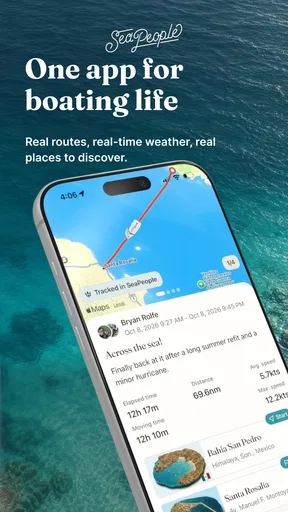
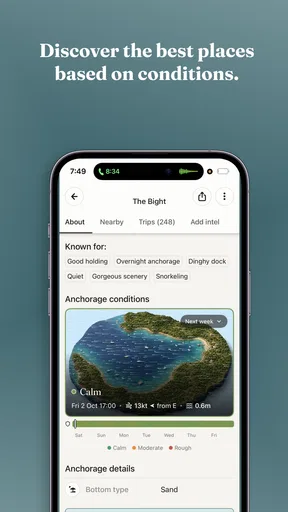
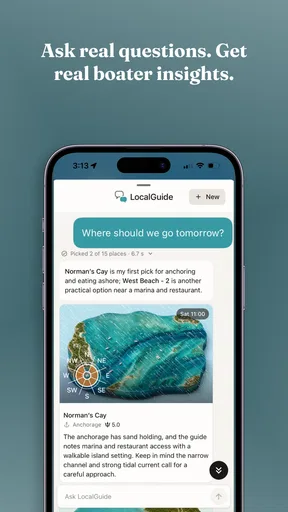
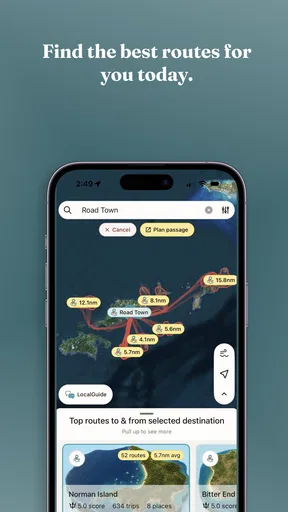
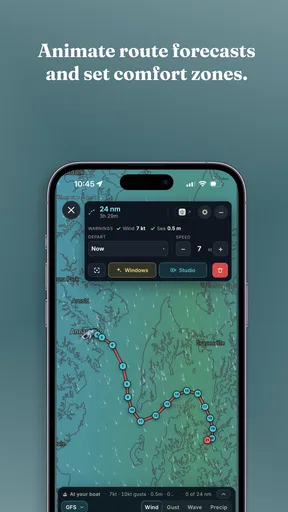
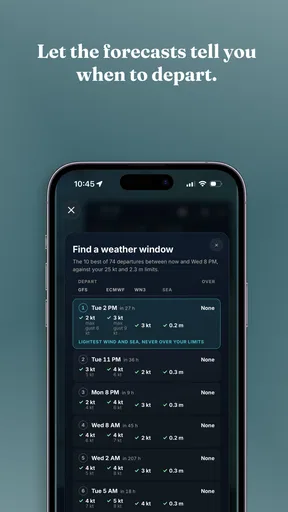
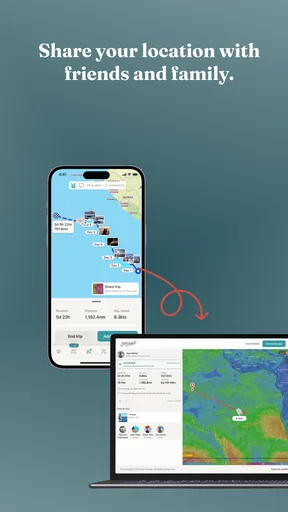
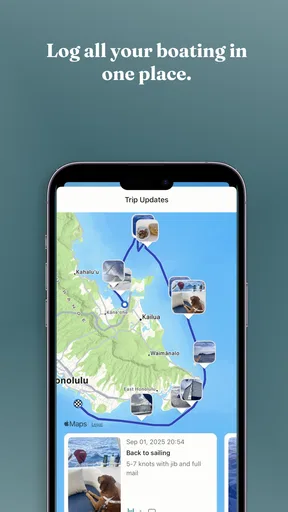
Our Review of SeaPeople: Boat Tracker
 Analysis by Appyee
When I think about a useful first boat-tracking app, I want it to make a real outing easier, not turn the helm into another screen-based chore. SeaPeople: Boat Tracker is aimed at that practical middle ground: keeping a record of where a trip went, helping plan a route, and making it possible to share a boat’s live position. It is a free travel and local app from SeaPeople Inc, with optional in-app purchases, and I see its appeal most clearly for people who go out regularly and want a simple digital companion to their time afloat.
What to expect before you leave the dock
The first thing I would keep in mind is that a phone app is a companion to sound boating judgement, not a replacement for it. GPS tracking can help you understand and review a journey, but a screen cannot take responsibility for watchkeeping, local navigation rules, or changing conditions. I would treat SeaPeople as a convenient layer for planning and sharing rather than the single source I depend on to make every decision on the water.
That distinction matters when comparing it with the usual alternatives. A dedicated chartplotter is designed around marine navigation and can be better suited to a boater who needs a purpose-built helm display. A general map app may be familiar on land but is not automatically a marine tool. SeaPeople’s value is its focus on boat trips, route planning, and shared location in one mobile setting. If your main goal is to remember where you went and let someone ashore follow along, that focus is more useful than a general-purpose map.
A calm first setup, not a rushed departure
I would install it and look through the app while still at home or alongside, rather than trying to learn it as the boat is moving. The app is free to start, but it offers in-app purchases ranging from $6.99 to $489.99 per item, so I would check what an optional purchase covers before paying and decide whether it suits the way I boat. There is no reason to assume that every useful part requires an upgrade; first work out what you actually need from your regular outings.
On first opening any GPS-based boat app, a sensible routine is to confirm that the map is showing the expected area and that the device can establish its position before you set off. I would also make sure the phone has enough battery for the outing and keep a normal backup plan for navigation. These are not glamorous setup steps, but they prevent a common disappointment: discovering that a phone is low on power or that you are unfamiliar with the screen only after leaving the dock.
If you are planning to share a live position, sort that out before the boat departs and tell the person ashore what the share is meant to help them do. A location link is most useful when someone knows roughly when to expect you and when a delayed return should prompt a check-in. It is not a substitute for an agreed emergency plan, and I would not present it to family as a guarantee that help will arrive automatically.
The first useful win: make one short trip count
For a first outing, I would keep the goal modest: prepare a straightforward route, start tracking when the trip begins, and save or review the journey afterward. That gives a new user a complete, low-pressure way to understand the core loop. You can see whether the route-planning and logging fit your habits without making your first test a complicated passage or a long day away from shore.
A realistic example is a weekend run from a familiar launch point to a nearby anchorage. Before leaving, I would plan the intended route and let a family member know I am sharing my location. Once underway, the live position gives them a way to follow the boat, while the trip record gives me something to look back on later. On the return, I can review whether the route matched what I intended and keep that record as a reference for another visit. The value here is not just a moving dot; it is connecting preparation, communication, and a useful trip history.
A small habit makes the log more worthwhile: decide before departure what you want to learn from it. Perhaps you want to remember the route to a quiet spot, compare the outbound and return paths, or simply keep a record of a day with friends. If every trip is logged without a purpose, the archive can become a pile of tracks you never revisit. A quick review soon after arriving back is more likely to turn the record into something useful.
Common points of confusion on the water
It is easy to confuse location sharing with navigation or emergency support. They solve different problems. A shared position can help someone see where the boat is, but that does not by itself tell them the boat is safe, explain why it stopped, or guarantee a response. I would pair sharing with a simple check-in plan and use established safety equipment and procedures appropriate to the trip.
Another point to clarify is what you expect from “route planning.” For a recreational outing, a planned line can help you organize where you intend to go and later compare intention with the actual trip. It should not encourage you to follow a screen blindly when conditions, hazards, or local knowledge suggest otherwise. The skipper remains responsible for choosing a safe course, and I would keep attention on the surroundings rather than repeatedly checking a phone.
Likewise, a GPS position is not the same thing as a complete navigation setup. Before relying on any phone-based tool, I would check that it behaves as expected in the places I commonly boat and that I know what I will do if the phone cannot be used. That practical test is especially important for longer trips, unfamiliar waters, or outings where a missed update could worry people ashore.
Who will get the most from it
I think SeaPeople is a good fit for casual sailors, powerboat owners, and other recreational boaters who want to remember their routes and make it easier for friends or family to follow a trip. It may also suit someone who is building a habit of reviewing outings and wants route planning and tracking together instead of keeping notes in separate places. Its Teen content rating and average rating of 4.7 across around 825 ratings suggest a broad audience response, though ratings alone cannot tell you whether its workflow matches your boat and routine.
I would be less inclined to recommend it as a primary tool to someone who needs a dedicated marine display, relies on a particular onboard navigation system, or expects an app to replace safety training and equipment. It may also be unnecessary for a person who rarely boats and has no interest in saving tracks or sharing their position. If you only need marine navigation at the helm, a purpose-built alternative may be the better choice; if your need is simply to coordinate a meetup on land, ordinary location sharing may be enough.
Setting Sail with SeaPeople
First things first, getting started with SeaPeople: Boat Tracker is a breeze. I downloaded it from the App Store, and within minutes, I was up and running. The interface is as user-friendly as it gets. Even if you've never used a boat tracking app before, you'll find this one intuitive enough to navigate without a hitch. The developers have clearly put thought into making it accessible for everyone from weekend sailors to seasoned captains.
Features That Keep You on Course
One of the standout features is the real-time GPS tracking. It’s like having a personal guide right in your pocket. With this app, I could see my exact location, speed, and even the direction I was heading. The map overlays are detailed and up-to-date, which is crucial when you're out at sea and need accurate information. Trust me, getting lost is not an option you want to consider.
Another cool feature is the weather updates. You can get forecasts, wind speeds, and tidal information directly on the app. This is a lifesaver, especially if you're planning a longer trip. Knowing what the weather is up to can help you make informed decisions and avoid any nasty surprises.
Keeping Your Journey Safe and Sound
Safety is always a priority on the water, and SeaPeople doesn’t skimp on this aspect. There's an SOS feature that allows you to send your location to emergency contacts in case of trouble. It’s reassuring to know that help is just a tap away, should you ever need it.
Plus, the app allows you to log your trips. This is not only a fun way to keep track of your adventures but also a handy way to review your routes and improve your boating skills. You can even share your journeys with friends or family, which adds a social element to your travels.
Integrating with Your Boating Gear
If you're a tech-savvy sailor, you'll love that SeaPeople can integrate with other marine devices. Whether it's your fish finder or onboard computer, the app’s compatibility is impressive. It syncs effortlessly, making it a seamless part of your boating experience.
Why You'll Love SeaPeople
Honestly, what’s not to love about this app? It’s packed with features that make your time on the water not just safe, but also enjoyable. I found the app to be a perfect blend of functionality and usability. Whether you’re out for a quick sail or embarking on a long journey, SeaPeople keeps you informed and prepared.
The community aspect of the app is also worth mentioning. There are forums and groups within the app where you can connect with other boaters. Sharing tips, tricks, and stories with fellow enthusiasts adds a whole new dimension to the boating experience.
Final Thoughts
In the end, SeaPeople: Boat Tracker is more than just an app; it's like having a first mate who's always ready to assist you. It’s reliable, packed with essential features, and incredibly easy to use. I’m genuinely impressed with how much thought has gone into making it a comprehensive tool for anyone who loves the sea.
If you're looking for an app that’s going to enhance your boating trips and keep you safe, this is it. Don’t let your next adventure be another "where the heck are we?" moment. Set sail with SeaPeople, and navigate with confidence.
Before you make it part of your routine
The app has more than 10K installs and is currently at version 3.1.0, with support for Android 7.0 and later. That makes it accessible to many older Android devices, but I would still check how the map and tracking feel on the phone you actually take aboard. Screen visibility, battery condition, and whether the device is easy to reach safely can matter more during a trip than the phone’s age on paper.
One useful trade-off is choosing when to record. Tracking every outing gives you a fuller history, but it also means you need a consistent habit of starting and ending trips so the log stays meaningful. For someone who only wants a record of special passages, selective tracking may be less cluttered. If you boat with others, decide who is responsible for starting the record; otherwise, a useful trip can be missed simply because everyone assumed someone else had begun it.
I would also treat shared location as a communication convenience, not an invitation for someone ashore to supervise every turn. Agree on a check-in time and what counts as a genuine concern before departure. That keeps the feature useful without creating unnecessary worry when the boat is simply stopped for a swim or a change of plan.
SeaPeople is at its strongest when the job is practical and specific: plan a recreational outing, capture where the boat went, and make the position easier to share. Its rating of 4.7 from around 825 ratings and a base of over 10K installs indicate that other users have found value in it, but I would still judge it by a short trial on familiar water. I’d start with one uncomplicated trip, review the result afterward, and only then decide whether it belongs in my regular boating routine.
Verdict
Strengths of SeaPeople: Boat Tracker
- Accurate real-time boat tracking.
- User-friendly interface design.
- Comprehensive weather updates.
- Offline maps available.
- Customizable notification alerts.
Limitations of SeaPeople: Boat Tracker
- Requires constant GPS access.
- Premium features are costly.
- Limited support for older devices.
- Occasional app crashes reported.
- High battery consumption.
Similar Picks in This Category
View All
Google Maps
Google LLC3.4

Google Maps Go
Google LLC4.1

Booking.com: Hotels & Travel
Booking.com Hotels & Vacation Rentals4.8

Google Earth
Google LLC3.8

Skyscanner Flights Hotels Cars
Skyscanner Ltd4.8

trivago: Compare hotel prices
trivago N.V.4.4
Frequently Asked Questions
What is SeaPeople: Boat Tracker and how does it work?
SeaPeople: Boat Tracker is a mobile application designed to help boat owners and enthusiasts keep track of their vessels in real time. Utilizing GPS technology, the app provides accurate location data and offers features like route planning, weather updates, and alerts for potential hazards. It's an essential tool for both casual sailors and professionals.
Is SeaPeople: Boat Tracker available for both Android and iOS devices?
Yes, SeaPeople: Boat Tracker is available for download on both Android and iOS platforms. Users can find the app on the Google Play Store and Apple App Store. It's designed to be user-friendly on both operating systems, providing a seamless experience no matter your device.
Does SeaPeople: Boat Tracker require an internet connection to function properly?
While SeaPeople: Boat Tracker uses GPS for location tracking, it does require an internet connection to access features such as real-time weather updates, route sharing, and social connectivity. However, basic GPS tracking can still function without a data connection, allowing for offline usage.
What are some of the standout features of SeaPeople: Boat Tracker?
SeaPeople: Boat Tracker offers various features including real-time GPS tracking, route planning, weather forecasts, and alert notifications for potential dangers. Additionally, users can share their routes with friends and family, enhancing safety and connectivity. The app also supports community interaction, allowing users to connect with fellow boaters.
Are there any subscription fees or in-app purchases required to use SeaPeople: Boat Tracker?
SeaPeople: Boat Tracker is available for free, but it offers premium features through optional in-app purchases and subscription plans. These may include advanced weather tools, expanded route storage, and enhanced tracking capabilities. Users can choose whether to upgrade based on their specific needs and preferences.
